
Best AI Dark Academia Generator
We review the best AI tools for achieving the Dark Academia aesthetic. See how CrafteAI's one-click generator compares to manual editing in Picsart and Fotor.
The Allure of Scholarly Chic
Dark Academia is more than just an internet trend; it's a subculture and aesthetic that celebrates knowledge, art, and classic literature with a moody, romantic twist. It evokes images of ancient universities, dusty libraries, and autumn afternoons spent reading poetry. Achieving this specific vibe in photos often requires the right location, wardrobe, and lighting. But now, AI generators promise to bestow this scholarly chic upon any photo with a single click.
We've reviewed the best AI Dark Academia generators to see which tools can genuinely transform a simple photo into a work of moody, intellectual art.
The Contenders: Best AI Dark Academia Generators
Our evaluation was based on:
- Aesthetic Accuracy: How well does the tool capture the authentic Dark Academia mood, color palette, and texture?
- Artistic Quality: Does the result look like a carefully edited photo or just a cheap filter?
- Ease of Use: Is the process quick and intuitive for everyone?
- Free Value: What quality and features are available for free?
Here’s how the top AI tools performed:
1. CrafteAI Dark Academia Generator
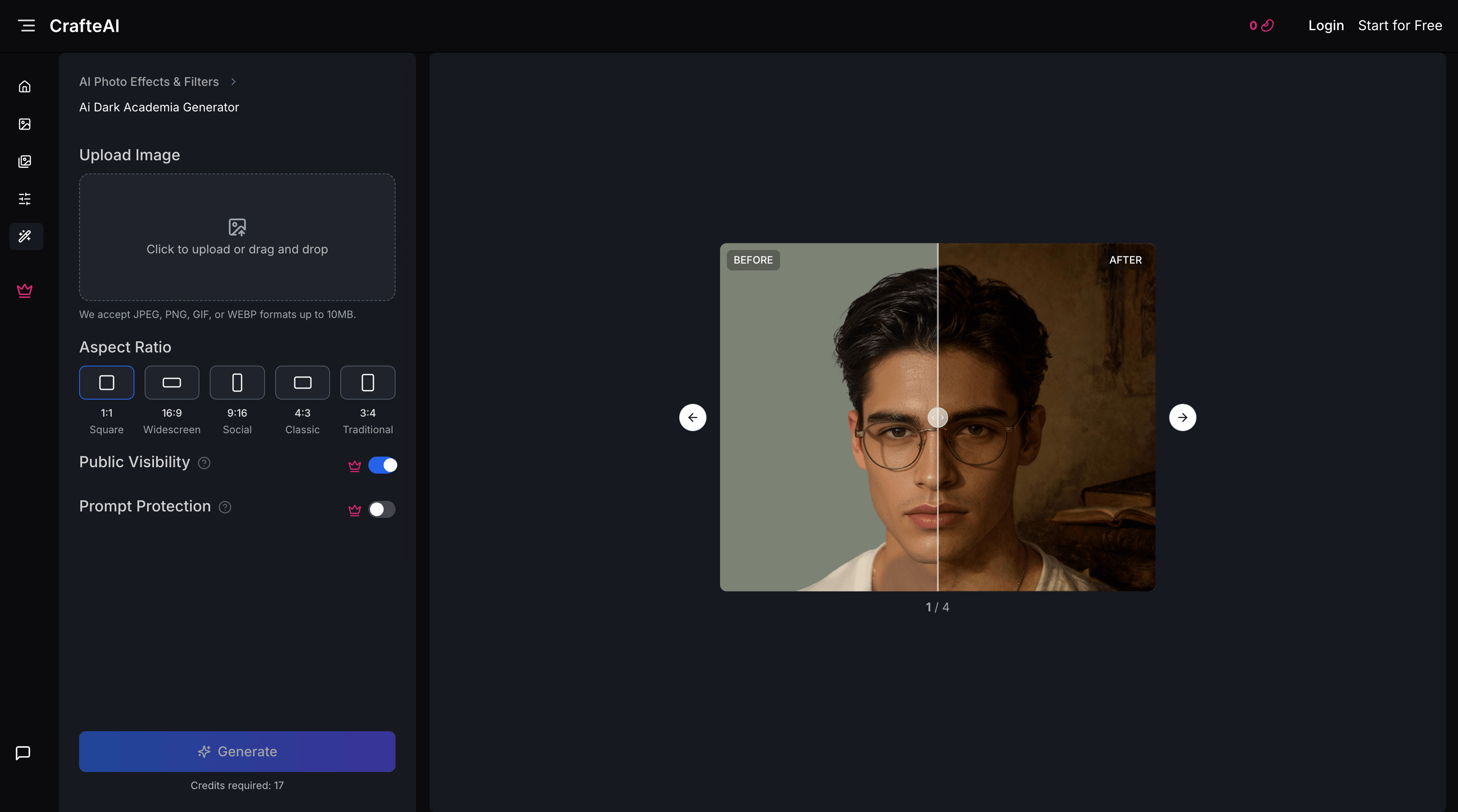
CrafteAI's AI Dark Academia Generator is a specialized, one-click tool that excels at capturing the subtle, moody essence of the aesthetic. It is designed for users who want an authentic and artistic transformation.
Pros:
- Authentic Mood and Color: CrafteAI perfectly nails the color palette—rich browns, deep greens, and warm, low light—that is the hallmark of the style.
- Subtle and Artistic: The effect is more than a filter. It adjusts lighting and adds a subtle texture that feels organic and high-quality, like a professional color grade.
- Effortless and Fast: The one-click process means there's no learning curve. You upload a photo and get a beautiful result in seconds.
- Genuinely Free: You can create and download high-resolution, watermark-free images without any cost.
Cons:
- No Intensity Slider: Users who want to fine-tune the strength of the effect won't find manual controls.
Best For: Anyone looking for a quick, free, and highly authentic way to apply the Dark Academia aesthetic to their photos.
2. Picsart's AI Filters
Picsart is a massive mobile and web photo editor with a vast library of AI filters. While it doesn't have a single "Dark Academia" button, users can combine several effects (like "Vintage," "Film Grain," and color adjustments) to approximate the style.
Pros:
- Highly Customizable: Offers immense control for users who want to layer different filters and manually adjust colors, brightness, and grain.
- Huge Library of Effects: You can mix and match to create a truly unique look.
Cons:
- Not a One-Click Solution: Achieving the Dark Academia look requires significant manual effort and a good eye for editing. It's not a "generator."
- Premium Subscription Needed: Many of the best filters and the ability to download in high quality are locked behind a Picsart Gold subscription.
- Time-Consuming: The process is much slower than using a dedicated generator.
Best For: Experienced photo editors who enjoy the process of manual tweaking and are already subscribed to Picsart.
3. Fotor's Vintage Filters
Fotor offers a range of vintage and retro filters that can be used to create a Dark Academia-esque feel. Like Picsart, it relies on combining effects rather than a single dedicated generator.
Pros:
- Easy-to-Use Sliders: The interface for adjusting filter intensity is straightforward.
- Good Starting Point: Some of the vintage filters provide a solid base color palette that aligns with the aesthetic.
Cons:
- Looks Like a Filter: The results often lack the sophisticated lighting and textural adjustments of a true AI generator, looking more like a simple color overlay.
- Ad-Heavy Experience: The free version is heavily supported by ads and frequent prompts to upgrade.
- Lacks Authenticity: It's hard to capture the specific mood of Dark Academia; you mostly just get a brownish tint.
Best For: Casual users who want to add a simple vintage look to their photos quickly.
Comparison Summary
| Feature | CrafteAI | Picsart | Fotor |
|---|---|---|---|
| Authenticity | ⭐⭐⭐⭐⭐ (Excellent) | ⭐⭐⭐ (Requires Effort) | ⭐⭐ (Filter-like) |
| Ease of Use | ⭐⭐⭐⭐⭐ (One-click) | ⭐⭐ (Manual & Complex) | ⭐⭐⭐⭐ (Simple Sliders) |
| Process | AI Generator | Manual Filter Layering | Applying Filters |
| Free Tier Value | ⭐⭐⭐⭐⭐ (Truly Free) | ⭐⭐ (Limited) | ⭐⭐⭐ (Ad-supported) |
| Best For | Authentic Style | Full Customization | Quick Vintage Look |
Conclusion: The Best Tool for a Moody, Scholarly Vibe
While manual editors like Picsart and Fotor offer flexibility, they require time, skill, and often a subscription to get close to the desired look. For a truly effortless and authentic result, CrafteAI's AI Dark Academia Generator is the clear winner.
It understands that Dark Academia is more about mood and lighting than just a color filter. It delivers an artistic, high-quality transformation that perfectly captures the aesthetic in a single click, for free.
To give your photos a touch of classic, moody elegance, try the CrafteAI Dark Academia Generator.